
Evernote - Note Organizer
Evernote by Bending SpoonsProductivity
3.5197.31K Reviews
- Version
- 11.31.7
- Installs
- 100.00M
- Age Rating
- Everyone
Screenshots
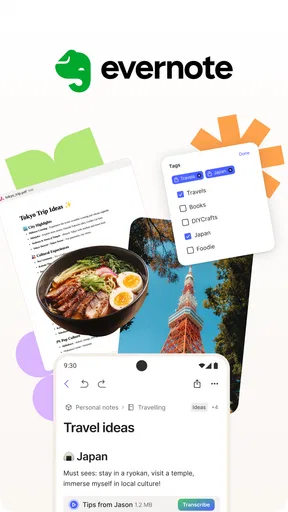
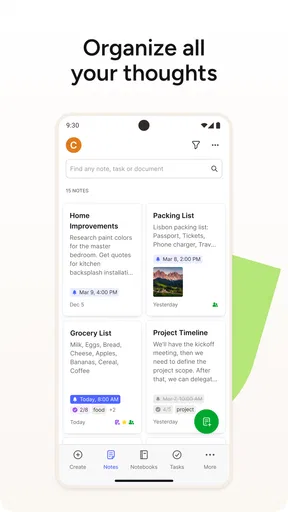
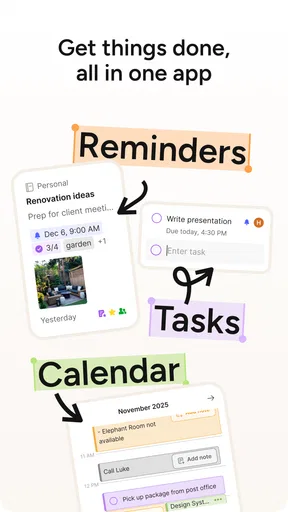
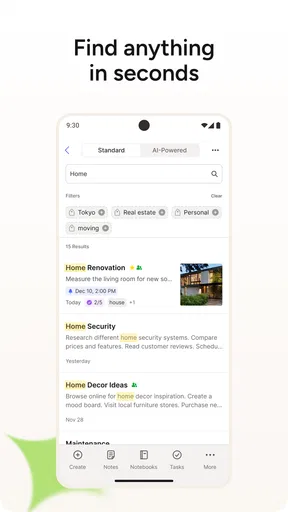

Our Review of Evernote - Note Organizer
 Analysis by Appyee
In the first few days with Evernote, the appeal is easy to understand: I can collect stray thoughts, plans, and reference material in one place instead of leaving them scattered across scraps of paper and unrelated apps. As a productivity app from Evernote by Bending Spoons, it feels most useful when I treat it as a working archive, not simply a blank page for occasional notes. It is free to start, rated for Everyone, and the current version is 11.4.2; optional in-app purchases range from about one dollar to around 255 dollars per item.
Why the first week feels promising
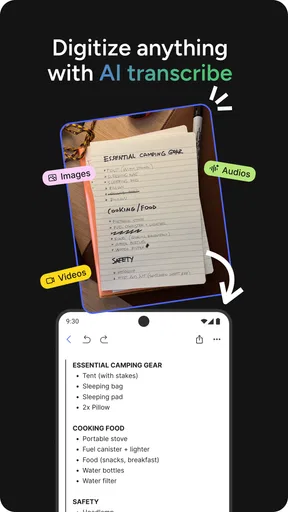
The initial setup can be as simple as making a notebook for a project and dropping notes into it. That low barrier matters: an organizer only helps if I actually capture things before forgetting them. Tags and notebooks give me two ways to sort material, while search can find text inside images, so I do not have to remember exactly where I filed every scrap.
A useful early habit is to create a few broad notebooks rather than designing an elaborate filing system. I might keep separate spaces for work, personal plans, and reference material, then add tags only when a subject crosses those boundaries. That keeps organization helpful instead of turning it into a second job. If I start with dozens of categories, deciding where every note belongs can become more tiring than writing it.
How it earns a place month after month
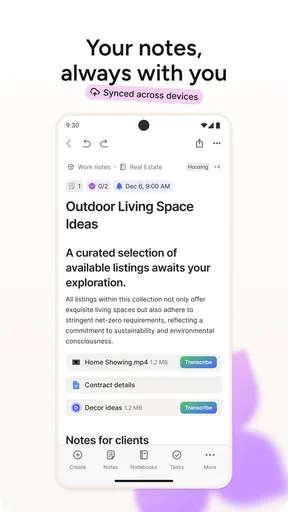
The lasting value comes from being able to return to accumulated material. A note can start as a quick reminder and later become part of a longer project; a saved article can sit beside my own observations about it. Syncing across devices supports that continuity, so I can capture something on my phone and revisit it later at a desk. The app has more than 100 million installs, though popularity alone does not tell me whether its workflow will suit a particular person.
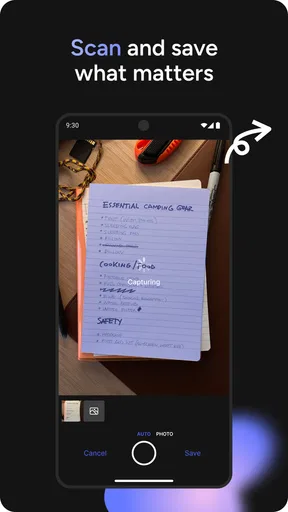
For a realistic day, I might scan a paper handout while out, add a short note about what I need to follow up on, then open the same material later when planning the week. The scanner is more useful when I give each capture context immediately: a clear title, a project notebook, and perhaps a tag. Otherwise, a digital pile can become just as hard to search as a physical one.
Evernote also sits between a lightweight notes app and a dedicated task manager. I can keep a to-do list beside the background information that explains it, which is handy for a project with research, meeting notes, and next steps. For a strict schedule or a team workflow built around assigning and tracking work, a dedicated planner may be a better fit. I would use Evernote to hold the context and another tool if the process depends on more specialized task controls.
The Ultimate Note-Taking Companion
First off, let me just say that Evernote is not your average note-taking app. It's a powerful tool designed to help you capture, organize, and access your notes from anywhere. Whether you're using it on Android or iOS, the experience is seamless. You can literally have your notes at your fingertips—whether you're on the go or at your desk.
One of my favorite features is the ability to sync notes across all devices. I mean, who doesn’t love the convenience of picking up right where you left off, no matter what device you’re on? This feature alone makes Evernote a lifesaver for anyone juggling multiple devices throughout the day.
Features That Make Evernote Stand Out
Now, let’s dive into some of the features that make Evernote truly shine:
- Tagging and Organization: Evernote lets you organize your notes with tags and notebooks, making it easy to find exactly what you’re looking for in seconds. The search function is robust and can even identify text within images!
- Web Clipper: This browser extension is a game-changer. With a click, you can save articles, images, and web pages directly to your Evernote account, making it perfect for research or keeping track of interesting reads.
- Task Management: Beyond just notes, you can create to-do lists and set reminders. It’s like having a personal assistant keeping you on track.
- Document Scanning: Evernote's built-in scanner allows you to digitize physical documents, making paper clutter a thing of the past.
These features make it clear why Evernote is a favorite among students, professionals, and even writers like me. The app adapts to your needs, and that flexibility is one of its strongest suits.
Design and Usability
The design of Evernote is clean and user-friendly, which is a huge plus for someone who easily gets overwhelmed by cluttered interfaces. The app's intuitive layout ensures that even new users can navigate through it with ease.
One thing I appreciate is the customization options. You can choose the layout that suits your style—whether that’s a list view, card view, or a detailed view. This level of personalization makes using Evernote a pleasant and tailored experience.
Is Evernote Worth It?
Now, you might be wondering if Evernote is worth the investment. With its free version offering a lot of functionality, it’s a great starting point. However, for those who need more storage, offline access, and advanced features, the premium version is definitely worth considering.
For me, the ability to access notes offline and the increased storage capacity have been invaluable. Plus, the premium version’s ability to search within PDFs and Office documents is a feature that can’t be overstated.
Where the routine can start to drag
The main maintenance cost is not typing; it is deciding what deserves a place and keeping useful material findable. Saving every page with the Web Clipper can feel productive at first, but a collection of unread articles is still a backlog. I get more value when I clip selectively, add a short note explaining why I saved something, and revisit it during a project rather than treating the archive as a goal in itself.
There is also a real trade-off between flexibility and simplicity. A plain notes app can be quicker when all I want is one temporary thought, while a calendar or task-focused planner is clearer for time-sensitive commitments. Evernote’s advantage is that tasks can live alongside supporting notes; its friction is that a person who wants only checkboxes may find the broader system more than they need.
Who should keep it—and who should move on
I would recommend it to students collecting class notes and reading material, writers keeping research near drafts, and people who repeatedly need to retrieve scanned paperwork or project details. It is especially useful for someone who works across a phone and another device and wants one searchable home for mixed content. Its average rating is 3.5 from around 1.9 million ratings, with about 198,000 reviews, so the response is mixed rather than universally enthusiastic; I would take that as a reason to test my own routine instead of assuming it will click immediately.
I would skip it if I mainly need a fast checklist, dislike maintaining folders or tags, or want a dedicated calendar to drive my day. It is also a poor fit if I know I will save material endlessly but rarely return to it. The best test is practical: capture a few real notes, retrieve them later by search, and see whether the filing choices still feel natural after the novelty wears off.
A few habits that make the archive more useful
For saved web pages, I try to capture only the section or material I expect to use, where that option suits the source, and give the note a title that makes sense outside the original browser tab. For a scanned document, I add a plain-language label such as the project or reason I may need it. Those small steps make search more dependable than relying on memory or a vague filename.
I also separate reference from action. A note containing background information can stay in its project notebook, while the next step gets written as a clear task with a reminder when timing matters. That prevents a long research note from pretending to be a workable to-do list. If I am collaborating or coordinating a complicated schedule, I would check whether a dedicated shared workspace or task app better matches the actual process rather than forcing every part into one notebook.
When deciding whether a paid option is worthwhile, I would first identify the specific restriction I keep hitting. More storage, offline access, and searching within PDFs or Office documents may matter to someone who depends on the app for substantial reference work; they do not automatically justify paying for a casual note habit. I would not upgrade simply because the app offers more. I would do it only if a feature removes a recurring obstacle in my own workflow.
Verdict after the novelty fades
In conclusion, Evernote is more than just a note-taking app; it’s a comprehensive organizer that can handle whatever you throw at it. Whether you’re a student, a professional, or just someone who loves staying organized, Evernote has something to offer. Its blend of functionality, design, and ease of use makes it a must-have app in my book. So, go ahead, give it a try. You might just find yourself wondering how you ever managed without it.
My longer-term judgment is a little more conditional: it earns a lasting place when I regularly capture material and later retrieve or act on it. Its combination of notebooks, tags, scanning, clipping, and search can save effort across recurring projects, but the same breadth can encourage over-collecting. I would keep the system deliberately small and review whether it is helping me finish work, not merely store it. On Android and iOS, version 11.4.2 requires OS version 9 or later. If that basic setup and the habit of maintaining a searchable archive sound useful, the free starting point makes it reasonable to try; if your needs are only quick lists, a simpler tool will likely feel lighter.
Verdict
Strengths of Evernote - Note Organizer
- Syncs effortlessly across devices.
- Robust search functionality.
- Supports various file formats.
- Customizable note templates.
- Collaborative note sharing.
Limitations of Evernote - Note Organizer
- Limited offline access in free version.
- Complex interface for new users.
- Premium features can be costly.
- Occasional syncing delays.
- High storage usage over time.
Similar Picks in This Category
View All
Google Calendar
Google LLC4.6

Google Drive
Google LLC4.3

Google Assistant
Google LLC3.9

Microsoft OneDrive
Microsoft Corporation4.6

Samsung Calendar
Samsung Electronics Co., Ltd.4.1

Microsoft OneNote: Save Notes
Microsoft Corporation4.6
Frequently Asked Questions
What platforms is Evernote available on?
Evernote is available on multiple platforms, including Android, iOS, Windows, and macOS. It also has a web version, allowing access from any browser. This cross-platform capability ensures that your notes and projects are synchronized and accessible wherever you are, providing flexibility and convenience for users who operate across different devices.
How does Evernote help in organizing notes?
Evernote offers a robust system for organizing notes through notebooks, tags, and shortcuts. Users can categorize notes into notebooks, apply tags for easy searching, and create shortcuts for frequently accessed notes. The app’s advanced search feature allows users to quickly find specific content, making it an efficient tool for managing large volumes of information.
Is it possible to use Evernote offline?
Yes, Evernote allows offline access, but this feature is primarily available for Premium and Business users. Offline access enables users to view and edit notes without an internet connection, which is particularly useful for those who need to work in areas with limited connectivity. Free users can access their notes offline by manually downloading them in advance.
What are the main advantages of using Evernote?
Evernote offers several advantages, including cross-platform synchronization, a powerful search engine, the ability to scan and digitize documents, and integration with other apps like Google Drive and Outlook. It also supports collaboration, allowing users to share notes and work on projects together, making it a versatile tool for both personal and professional use.
Are there any limitations to the free version of Evernote?
The free version of Evernote has some limitations compared to its Premium and Business counterparts. Users are limited to syncing across two devices and have a monthly upload cap of 60 MB. Advanced features such as offline access, PDF annotation, and integration with email are also restricted in the free tier, prompting some users to consider upgrading for a more comprehensive experience.
